

When a warning icon pops up on your tractor dash, it’s easy to lose time guessing whether it’s safe to keep working. In this guide, we’ll break down Mahindra tractor warning lights meaning in plain terms, show how the dashboard is usually laid out, explain tractor warning lights color codes, and give a step-by-step troubleshooting process so you can decide what to stop for now and what can wait until the next service window.
What Does the Dashboard of a Mahindra Tractor Look Like?
Mahindra tractor dashboards vary by model and year, but many layouts follow the same logic: (1) gauges/meters you watch during operation, (2) indicator lamps that tell you what system is active or has a fault, and (3) switches for lights and safety signals. Knowing which “zone” you’re looking at cuts diagnosis time fast.
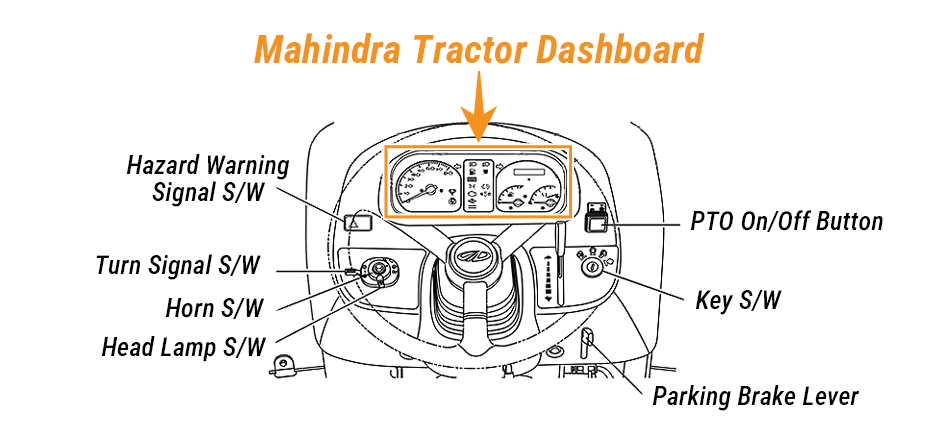
1) Meter and gauge area
This part helps you monitor the tractor while it’s working—especially under load, during PTO work, or in hot weather.
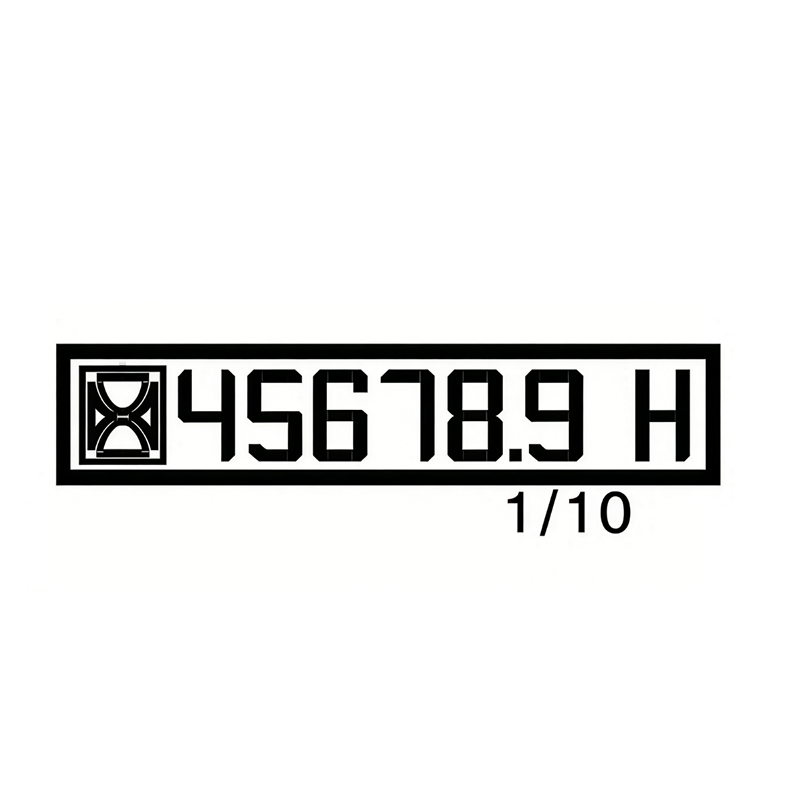
Hour meter
- What it shows: Total engine run time.
- Why it matters: Service intervals on off-road machinery often follow hours, not miles.
- Practical use: If warning lights start showing up “right after service,” check the hour meter to confirm what was actually done and when.
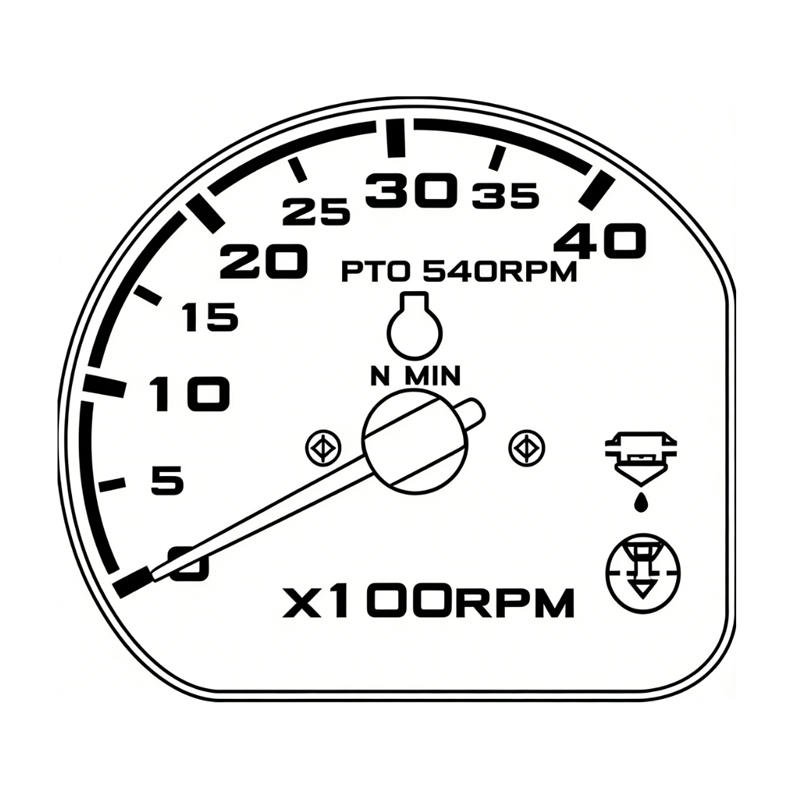
Tachometer
- What it shows: Engine revolutions (RPM). On many tractors, the tach area also helps you judge PTO speed and sometimes travel speed in a top gear reference.
- Why it matters: Many problems show up at certain RPM ranges (charging output, oil pressure at idle, overheating under load).
- Field tip: If a warning light appears only at low RPM, raise RPM slightly and see if it changes—then diagnose the cause instead of ignoring it.
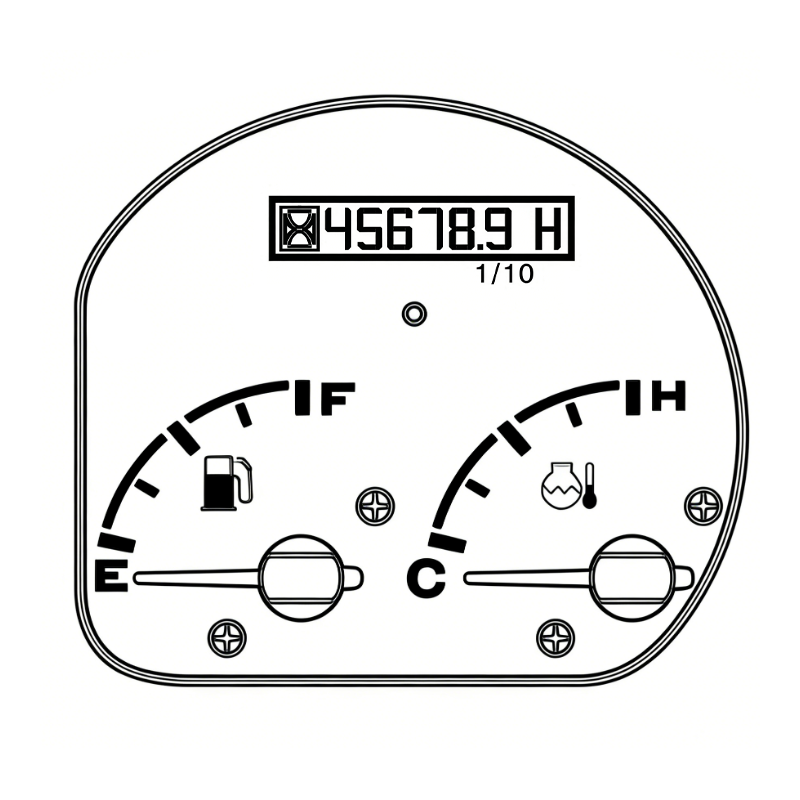
Water temperature gauge
- What it shows: Coolant temperature when the ignition is ON.
- What to watch:
- Normal range = stable operating temperature
- Needle moving into a high/red area = overheating risk
- Immediate action: If the gauge goes high, reduce load and airflow-blocking debris, and be ready to shut down to prevent damage
2) Indicator lamp area
Indicator lamps usually illuminate briefly at key-on as a bulb check, then turn off—unless a system is active (like high beam) or a fault is present (like low oil pressure).
Common icons you may see include:
- Battery/charge lamp
- Oil pressure lamp
- PTO monitor lamp
- High beam / low beam indicators
- Glow signal lamp (diesel preheat)
- Air cleaner filter contamination indicator
3) Switch area
Hazard warning signal switch
- What it does: Activates hazard lights (left and right indicators flash together).
- When to use: Road crossings, low-visibility work areas, loading/unloading, or when stopped due to a warning condition.
Transition: Once you know where to look on the dash, the next step is knowing what each warning/indicator means—and what action keeps your engine and PTO system safe.
Mahindra Tractor Warning Lights and Meanings
Below are common dash indicators and what they typically mean on Mahindra tractors, based on the descriptions you shared. Since dashboards differ, always confirm your exact icon set with your operator manual—especially for models with extra emissions or electronic features.
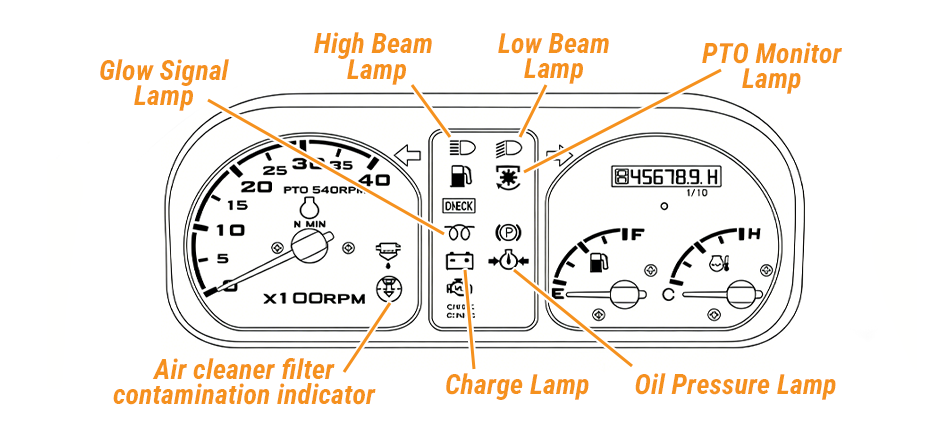
Quick reference table
| Light / Indicator | What it usually means | What you should do |
|---|---|---|
| Charge lamp | Charging system issue; may relate to alternator output. A broken belt can also trigger it and can lead to overheating if not fixed. | Stop unnecessary electrical loads. Check belt condition/tension and wiring. If an overheating risk is present, shut down and fix it before continuing. |
| Oil pressure lamp | Oil pressure is not correct. It should go out shortly after the start if pressure is normal. | Stop the engine if it stays on or comes on while running. Check oil level first; don’t keep running “to finish the job.” |
| PTO monitor lamp | PTO status/monitoring indicator (PTO operation reference). | Confirm PTO engagement setting and RPM. If PTO behavior is abnormal, disengage and inspect the linkage/switches before continuing. |
| High beam lamp | High beam headlights are ON. | Normal indicator. Dim high beams around people/traffic. |
| Low beam lamp | Low beam headlights are ON. | Normal indicator. Use for standard lighting. |
| Glow signal lamp | Diesel preheating is active. | Normal during cold starts. If it behaves oddly (never comes on / never turns off), inspect the glow circuit or get service help. |
| Air cleaner filter contamination indicator | The air cleaner is clogged with debris. | Open the air cleaner, clean housing, blow out the filter in the intake-air direction, or replace the filter. Don’t ignore—restriction hurts power and can increase smoke. |
Transition: Warning lights give you a message, but the color tells you the urgency level. That’s where color code rules help you decide what happens next.
Mahindra Tractor Dashboard Warning Lights Color Code
Not every Mahindra dashboard uses the same color scheme for every icon, but color coding across heavy equipment follows a consistent safety pattern.
Typical color meaning
- Red = Stop now / protect the engine
- Examples: oil pressure-related warnings, difficult temperature/overheat situations, critical charging failures that could lead to overheating (belt-related).
- Action: Safely stop, idle briefly if needed (only if temperature is stable), then shut down and inspect.
- Amber/Yellow = Caution/service soon
- Often means a restriction, sensor alert, or maintenance-related problem.
- Action: Reduce load, finish the current pass if safe, then check the system before extended operation.
- Green = System active
- Often indicates an operating mode is ON (lights, PTO status indicator on some layouts).
- Action: No repair needed—just confirm it matches what you intended to turn on.
- Blue = High beam active
- Common for the high beam indicator.
- Action: Normal.
How to Troubleshoot Mahindra Tractor Warning Lights?
Use this process when any tractor warning lights appear during operation. It’s designed for off-road machinery work conditions—dust, heat, heavy load, and long run time.
Step 1: Make the situation safe
- Move to a flat area if possible.
- Engage the parking brake and lower the implements to the ground.
- Set hazards if you’re near other equipment or traffic.
Step 2: Identify which light and match it to the operating symptom
Ask two quick questions:
- Did the tractor change how it runs (power loss, rough running, smoke, stalling)?
- Did the light come on at start, under load, or at idle?
That timing often points to the system:
- At start: glow lamp behavior, oil lamp staying on, charge lamp not going out.
- Under load: temperature gauge climbing, air restriction indicator, and charging issues showing up with fans/lights.
- At idle: oil pressure warning (low pressure at low RPM can be real or a sensor/wiring issue—still treat it seriously).
Step 3: Troubleshoot by light
A) Oil Pressure Lamp
If it comes on while running:
- Shut the engine down.
- Check oil level (correct grade matters too, but level is the first check).
- Look for obvious leaks around the filter, drain plug, or engine.
- If the oil level is normal and the lamp stays on after restart, stop and get expert service help—running can destroy the engine quickly.
B) Water Temperature Gauge trending high
- Reduce load immediately (disengage PTO if needed).
- Check for blocked airflow (chaff, grass, dust packed into the cooling area).
- Verify coolant level only when safe and cooled (hot systems can burn).
- Don’t keep working in the red/high zone—overheating can warp components and cause long downtime.
C) Charge Lamp
Since your provided note mentions belt failure as a cause—and belt failure can also remove the cooling fan drive on some setups—treat this as more than “battery only.”
- Check belt condition and tension.
- Inspect wiring at alternator and battery connections (loose/corroded connections cause charging faults).
- Limit electrical load until fixed (lights, accessories).
- If the temperature begins rising, stop and correct the cause.
D) Air Cleaner Filter Contamination Indicator
Restricted air flow can cause power loss and poor combustion.
- Open the air cleaner housing.
- Clean the inside of the cleaner.
- Blow air through the filter in the direction of intake air (per your note), or replace it.
- Recheck the indicator after service.
E) Glow Signal Lamp
- Normal: Comes on during preheat, then goes off.
- Not normal: Stays on too long, never lights, or flashing patterns (if equipped).
Action: Check battery health, wiring, and glow system components if starting becomes difficult.
F) PTO Monitor Lamp / PTO-related indicator
- Confirm PTO is engaged only when intended.
- Confirm RPM and load match the implement.
- If PTO engagement feels abnormal (noise, vibration, slipping), disengage and inspect the linkage/switches before continuing.
Transition: After troubleshooting, many owners ask the same question: “Do I fix it now, or can I run until the next maintenance window?” The next section helps you make that call and find the right parts without wasting money.
If a warning light points to a maintenance item (filters, electrical wear parts) or you confirm a failed component during inspection, replacing it with the correct match saves repeat faults. For model-specific options, browse Mahindra parts to quickly narrow by tractor applications.
For broader categories beyond one brand—filters, hydraulic/electrical parts, and common tractor systems—use the full tractor parts catalog to cross-check fitment and bundle service items in one order.
Conclusion
Knowing the Mahindra tractor warning lights’ meaning helps you protect the engine, PTO system, and work schedule. Use the dashboard layout to quickly find gauges and indicator lamps, then apply the color-code rule: red means stop, amber means check soon, green/blue usually means a system is on. Troubleshoot in a repeatable order—oil pressure and overheating first—so small faults don’t turn into major downtime.
